Flavors (kanji markers)
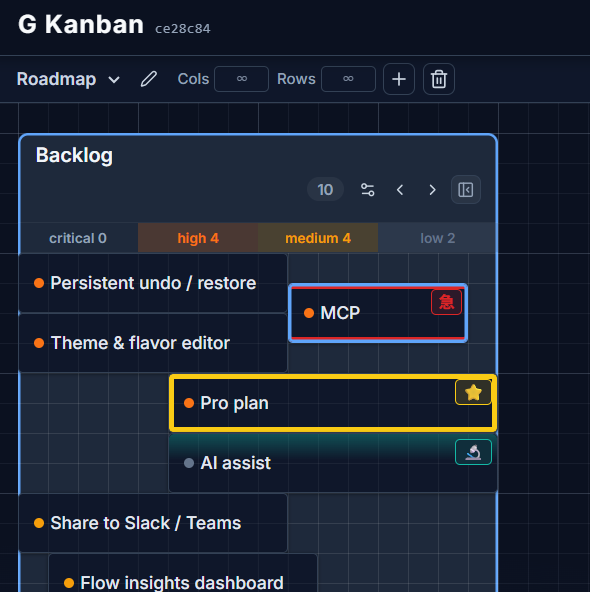
A flavor is a semantic visual marker you can apply to any card — a kanji, an emoji, or any single character, paired with a colored accent along the card’s edge. Think of it as a marker type that reads at a glance, faster than a label.
Built-in flavors
Section titled “Built-in flavors”G Kanban ships with three defaults:
- Urgent — 急, red, bars along the top and bottom edge
- Blocked — ⛔, gray, a full border
- Highlight — ⭐, yellow, a full border
Creating your own
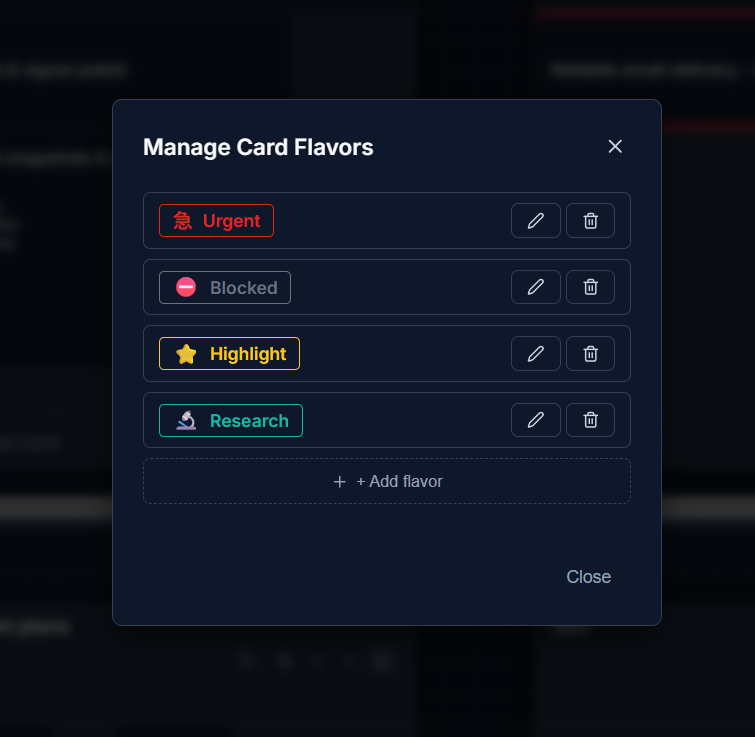
Section titled “Creating your own”Open Manage Flavors from the flavor picker in a card’s detail panel. For each flavor you can set:
- Glyph — a kanji (急), an emoji (🔥), or any single character. Leave it empty for a color-only marker. A curated emoji picker is included for quick selection.
- Glyph position — top-left (inline, flows with the title) or a corner badge (top-right, bottom-left, bottom-right).
- Accent color
- Treatment — how the accent is painted: bars on the top and bottom edges, bars on the left and right edges, or a border on all four sides.
- Thickness — thin, medium, or thick.
You can have up to 5 flavors at a time (plus “None”).
Deleting a flavor
Section titled “Deleting a flavor”Deleting a flavor doesn’t strip it off cards that already use it — those cards show a note that they reference a deleted flavor, with a one-click option to clear it. If you recreate a flavor, cards referencing it by the same identity pick the look back up automatically.