Sharing a board publicly
A public share link lets anyone view one of your boards read-only, with no sign-in and no account. It’s good for a public roadmap, a status snapshot for a client, or showing progress to someone who will never install a kanban tool.
The link looks like https://gkanban.com/b/<token> and always shows your latest synced version of the board. There is no write path: a viewer can’t add, move, edit, or delete anything, and they can’t open a card.
What you need
Section titled “What you need”Both of these:
- A Pro subscription, and
- Cloud sync turned on for the specific board you want to share.
A share link publishes the cloud copy of a board. A free account’s boards never leave the browser, so there is nothing to serve — the app explains this and won’t let you create a link. The same goes for a board that has sync switched off individually.
Creating a link
Section titled “Creating a link”Share links are managed from a Public share links section in Settings.
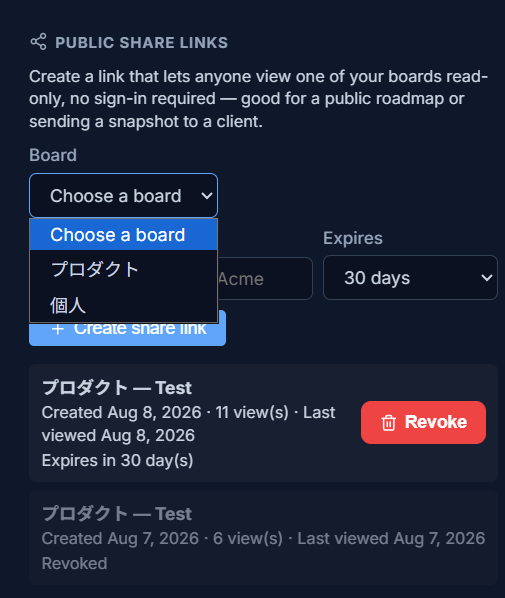
To create one:
- Choose the board to share (only cloud-synced boards are listed).
- Optionally give the link a name for your own reference, like “Q3 roadmap for Acme”.
- Choose when it expires: 7, 30, or 90 days, or never. The default is 30 days.
- The first time you ever create a link, a warning appears explaining exactly what is and isn’t exposed. You have to acknowledge it before the link is created.
Managing your links
Section titled “Managing your links”The list shows, for each link: which board it points at (and the name you gave it), the date you created it, how many times it has been viewed, when it was last viewed, and its current state. A working link shows either its countdown — “Expires in 30 day(s)” — or Live if you set it to never expire. Otherwise it reads Expired or Revoked.
- Revoke takes effect immediately. Anyone holding the URL loses access on their next request; nothing is cached that could keep serving it.
- Revoking can’t be undone, and an expired link can’t be re-enabled. In both cases you create a new link, and the old URL stays dead forever.
- If your Pro subscription lapses, existing links stop working but are not deleted — they’d start working again if you resubscribe, and you can still revoke any you no longer want shared.
Exactly what a shared board exposes
Section titled “Exactly what a shared board exposes”The short version: viewers see how far along a card is, not what its tasks say or who is working on it.
The longer version — this is decided on the server, so what’s below is the complete list of what a viewer can get, not just what the page happens to draw:
| Visible to anyone with the link | Never shared |
|---|---|
| Card titles | Card descriptions |
| Labels and priority | The wording of checklist items |
| Due dates | Who a card is assigned to |
| Checklist progress as counts (“3 of 5 done”) | A card’s column-movement history |
| Card flavor and visual styling | |
| Each card’s size and position on the grid | |
| Column titles, WIP limits and card counts | |
| Each column’s aging stat (oldest and average card age) and its priority breakdown | |
| The board’s title |
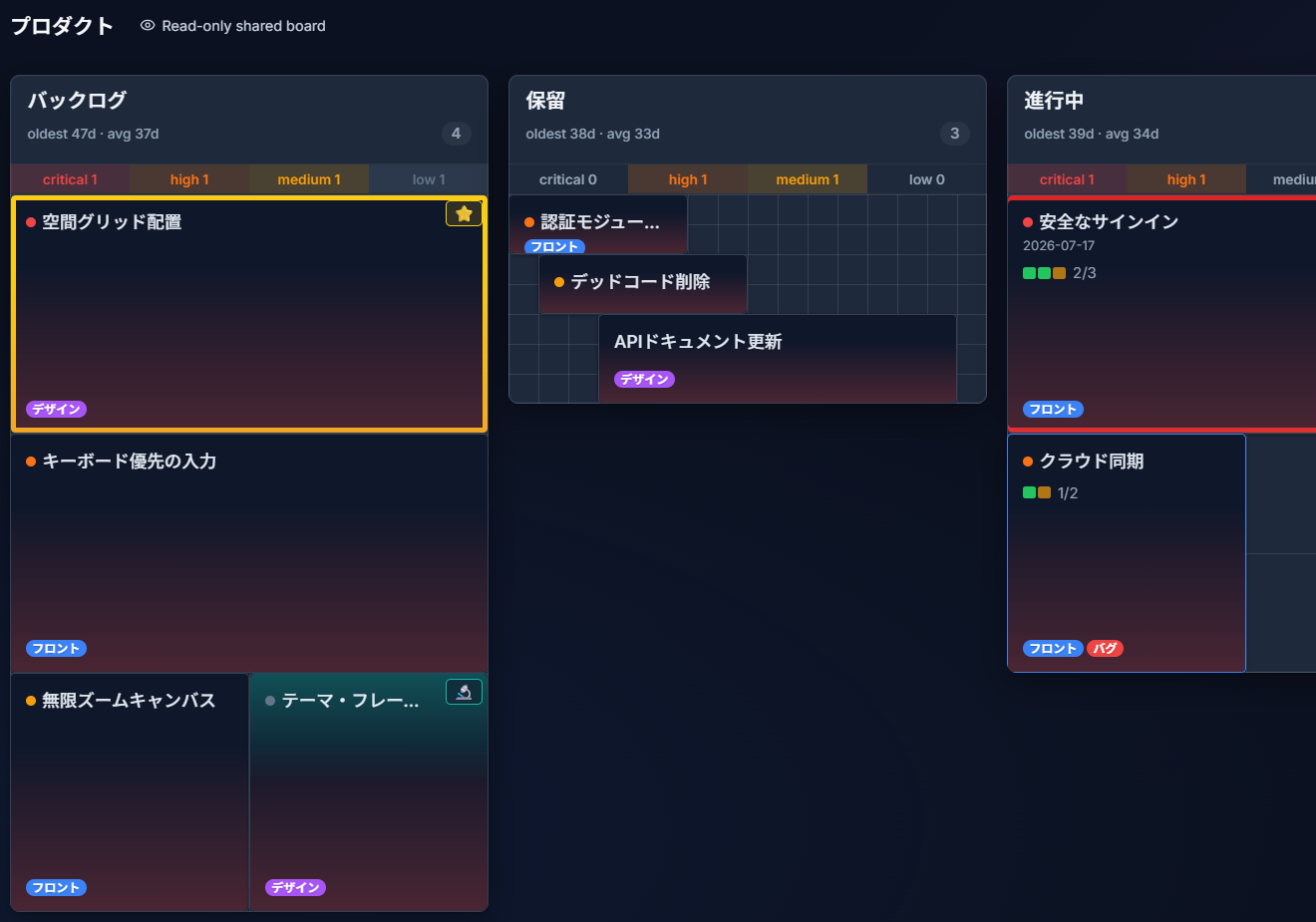
Notice what’s on those cards: a title, a due date, a checklist reading 2/3. Not one word of what those two finished tasks were, and no name attached to any of it.
A few details worth knowing:
- There is no tap-through card detail on a shared board. Viewers cannot open a card, so there’s no second screen where the private fields could appear.
- Checklists are sent as two numbers — done and total. The item text is never transmitted at all.
- Archived cards are not included — a shared board shows only what’s actually on the board.
- The board is rendered with your real column widths, grid settings, and free-form “exact placement” positions, so it looks like your board rather than a generic export.
- If you have Insights turned on, the ambient freshness wash appears on the shared board too, which does show viewers roughly how long cards have been sitting.
This is the same split described in the Privacy Policy §3f and in the warning the app shows you before your first link.
Treat the link like a password
Section titled “Treat the link like a password”A share link is a capability — holding the URL is the entire permission check. There’s no password prompt and no allow-list of people, so anyone the link is forwarded to can view the board, and so can anyone who finds it pasted in a public chat or ticket.
That’s the trade for a link that works for everyone instantly with no accounts to manage. Share it the way you’d share a password, set an expiry when you don’t need it open-ended, and revoke it when the project’s over.
Shared boards are not indexed by search engines or AI crawlers (they carry a noindex header and are disallowed in robots.txt), and they are served uncached, which is what makes revocation instant.
Viewer privacy
Section titled “Viewer privacy”For each link, G Kanban records a view count and the time of the last view. That’s it.
No viewer IP address, no viewer identity, no analytics, and the shared board page sets no cookies and writes nothing to the viewer’s local storage. You can see that a link has been opened 14 times and when it was last opened; you cannot see who opened it, and neither can we.
On phones and desktop
Section titled “On phones and desktop”Shared boards render on any device with no app to install. On desktop the columns sit side by side at your real widths; on a phone you get the same swipe-through column pager as G Kanban’s own mobile read-only view.
If a link says the board isn’t available
Section titled “If a link says the board isn’t available”That one message covers every case on purpose — revoked, expired, never existed, board deleted, sync turned off for the board, or the owner’s Pro subscription lapsed. It’s deliberately vague so nobody can use the endpoint to probe which links exist. If you’re the owner, check the link’s state in Settings; if you’re a viewer, ask whoever shared it for a new link.